If you've ever wished you could simply click on a phone number on a website to make a call, then you're in luck! With the
Chrome extension
, you can do just that. This handy tool turns phone numbers into clickable links, allowing you to dial them with a single click. No more hassle of copying and pasting the number into your phone.
When it comes to user ratings, this extension has received a total rating of 3.97 out of 5. While some users have had mixed experiences with it, it's important to remember that individual experiences can vary.
Enhance Your Calling Experience
The
Chrome extension
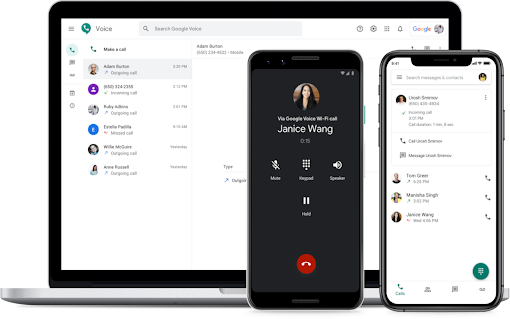
is designed to enhance your calling experience by providing a convenient way to make calls using Google Voice. Once installed, the extension adds a Voice icon next to phone numbers on webpages. Simply click on the icon, and you'll be connected to the number using Google Voice. It's that easy!
Even if a phone number doesn't automatically turn into a link, you can still make a call by selecting the text and right-clicking. Please note that this feature may not work with all numbers, but it's a handy alternative when needed.
Customize to Your Preference
One of the great features of this extension is the ability to customize its behavior. If you prefer not to have phone numbers turned into Voice icon links, you can easily disable this feature in the extension options. This allows you to tailor the extension to your specific needs and preferences.
User Reviews
Let's take a look at what users have to say about their experience with the Chrome extension:
-
Setu Upadhya: "This extension is useless. It just re-directs to Google Voice. I want to call while staying on the same URL."
-
Kev Mann: "What does this extension do??? I still have to open the Google Voice website to use the features of Google Voice. No calls ring in my browser unless Google Voice is an open tab, which defeats the whole point of the extension. This is pretty much the most useless extension in the store."
-
Zachary Yaro: "It performs the basic function of adding a Google Voice icon next to phone numbers on web pages, but the toolbar button just opens the Google Voice web app, so if you turn off showing icons next to phone numbers, it is no better than a bookmark."
-
Mike Gentry: "Love it."
While some users have expressed dissatisfaction with the extension's functionality and its reliance on the Google Voice web app, others have found it to be a useful tool for making calls conveniently. Ultimately, it depends on your own needs and preferences.
Conclusion
The Chrome extension offers a convenient and efficient way to make phone numbers callable using Google Voice. Whether you prefer clicking on the Voice icon or selecting the text to initiate a call, this extension provides flexibility and ease of use.
Despite the mixed reviews, it's worth giving this extension a try to see if it enhances your calling experience. Remember, individual experiences can vary, so it's always best to test it out and see if it meets your specific needs. Happy calling!














20 Reviews For This Extension
This extension WAS useful - but now it's simply a "bookmark" to go to Google Voice, and in the Options you can turn Phone number links off/on. Useless otherwise. Hard fail Google.
For making calls this is a great app, I love the fact that right clicking a number gives me the option to call the number using Google Voice, BUT it is immensely annoying that the same functionality is not offered to send a TEXT message to the number. So much copy and pasting required to get the job done, come on Google Voice, get your act together.
Does absolutely nothing than opening the google voice webpage. Might as well use a bookmark. Removed immediately.
You used to be able to use this extension to send texts, but all it does is open the website. I don't understand the point of it
To contact Google Voice customer support, visit the Google Voice Help Center, browse articles for troubleshooting, or use the Contact Us option for personalized assistance if available based on your account type.
This extension used to be amazing, till they nerfed it. Used to let you send text/call via a pop-up box. Now all it does is open the Google Voice website for ya. Useless.
Sorry to tell you all who's put bad reviews out google phone number work for all phones and computers no matter what you're doing i've had nothing but good luck in 2009 at the same number it doesn't random it does not delete I keep the same number to all my cell phones I never use a cell phone number so I don't know why everybody's having problems with it oh good luck
so far i get unlimited calling , texting, data and dont ave to pay a dime. i love it, i havent had one issuewith it
If I am trying to get a phone number why are you telling me I have to put one in to get a number ? I dont have a number so why tell me to put one in when I am trying to get one? THIS IS USELESS!!! 1 STAR!!!
I have an old "Google Voice" phone number and also get the "you must use it or lose it" messages, BUT I installed this extension because I recently got GoogleFi (Fiber) connection for internet and also added for a measely $10 more per month their phone option. This DOES work on my company issued computer (on Windows 11) but does NOT work on my personal computer (which I also use for other business purposes). I'm about to install Windows 11 on this computer so that I'll have a fully functioning click-to-dial on this computer and for my personal and non-employer related businesses. Do I LIKE that I have to go to Windows 11? NO - but being forced to adapt to it because my new employer issued computer replacing one with Wndows 10 I have come to actually LOVE some of the Windows 11 features. Haven't tried to install a printer - I had Windows 11 "forced upgrade" a while back on another computer and never COULD get it to connect with a printer - but I've heard that this isn't as big of a deal as it was, plus what are we talking for a home ink jet printer? For under $100 I can buy a pretty nice, current one and forget this four year old (or more!) antique. My verdict - I THINK it's gonna work great! Don't know yet, as on my employer issued computer I'm having some issues with headset versus speaker, but then I have a LOT of problems with that because I use Ring Central, Teams, Zoom, Webex, LinkedIn, Google Meet, and other facilities and constantly have to reset (and/or reBOOT) the computer to adjust to all of the changes. SOME day maybe we'll have a universal plug and play for this stuff - but not yet. The issues around this with Zoom/Teams along remind me of the old days when Novell (original networking system, created out of Utah by a bunch of Mormons) and Microsoft (the second comer to the networking field, created by hippies and stoners out of the California/Pacific Northwest patch) would CONSTANTLY write code to DELIBERATELY make their competitor's systems incompatible and/or crash.
Unfortunately -- and this is not the fault of the extension but Google Voice itself -- no matter how it is accessed, it is not working half the time I attempt to use it. But that does not stop Google from emailing me every 2 months that my GV number is about to expire if I don't use it more. SMH.
WHERE IS CLICK TO CALL? This is a useless extension, what does it do but open a new tab? Click to call feature does not work, they say "Register" when I click on that button nothing happens. Who designed this and decided that this was a useful extension? IT DOES NOTHING
What is this worthless trash? I click the toolbar button and it just opens Google Voice in a new tab? Why wouldn't I just use a bookmark?
I'm signed into multiple Google accounts in Chrome and I don't want the Google Voice extension using the default one (which is what it does). But, there's not option to switch accounts within the extension.
this extension is useless. It just re-directs to Google voice. I want to call while staying on the same URL
Garbage
What does this extension do??? I still have to open the Google Voice website to use the features of Google Voice. No calls ring in my browser unless Google Voice is an open tab, which defeats the whole point of the extension. This is pretty much the most useless extension in the store.
Turns every number into a click to call link, which is nice, but every click opens up GV in a new tab, causing Chrome to waste even more memory than usual. Laughably substandard support documentation for the extension and for Google Voice in general. But ultimately we're uninstalling because Google dropped the ball on our number port on the one yard line and we haven't been able to receive calls for a week... and counting... so we have to change to a completely different provider. Pretty sad.
by default the extension will be able to access your camara according to the system last access. I understand that this extension might have the capability to make video calls too, in my opinion, they should ask first :) . I blocked the access manually and monitoring it closely to see how do they do ... Great app tho, beside that .
It performs the basic function of adding a Google Voice icon next to phone numbers on web pages, but the toolbar button just opens the Google Voice web app, so if you turn off showing icons next to phone numbers, it is no better than a bookmark. You used to be able to get an extension from Google that would show how many unread texts/voicemails you had on the extension icon as well, and let you preview them in a pop-up; this is a massive downgrade from that.